> ## Documentation Index
> Fetch the complete documentation index at: https://platform.kimi.ai/docs/llms.txt
> Use this file to discover all available pages before exploring further.
# Dynamically Loaded Tools
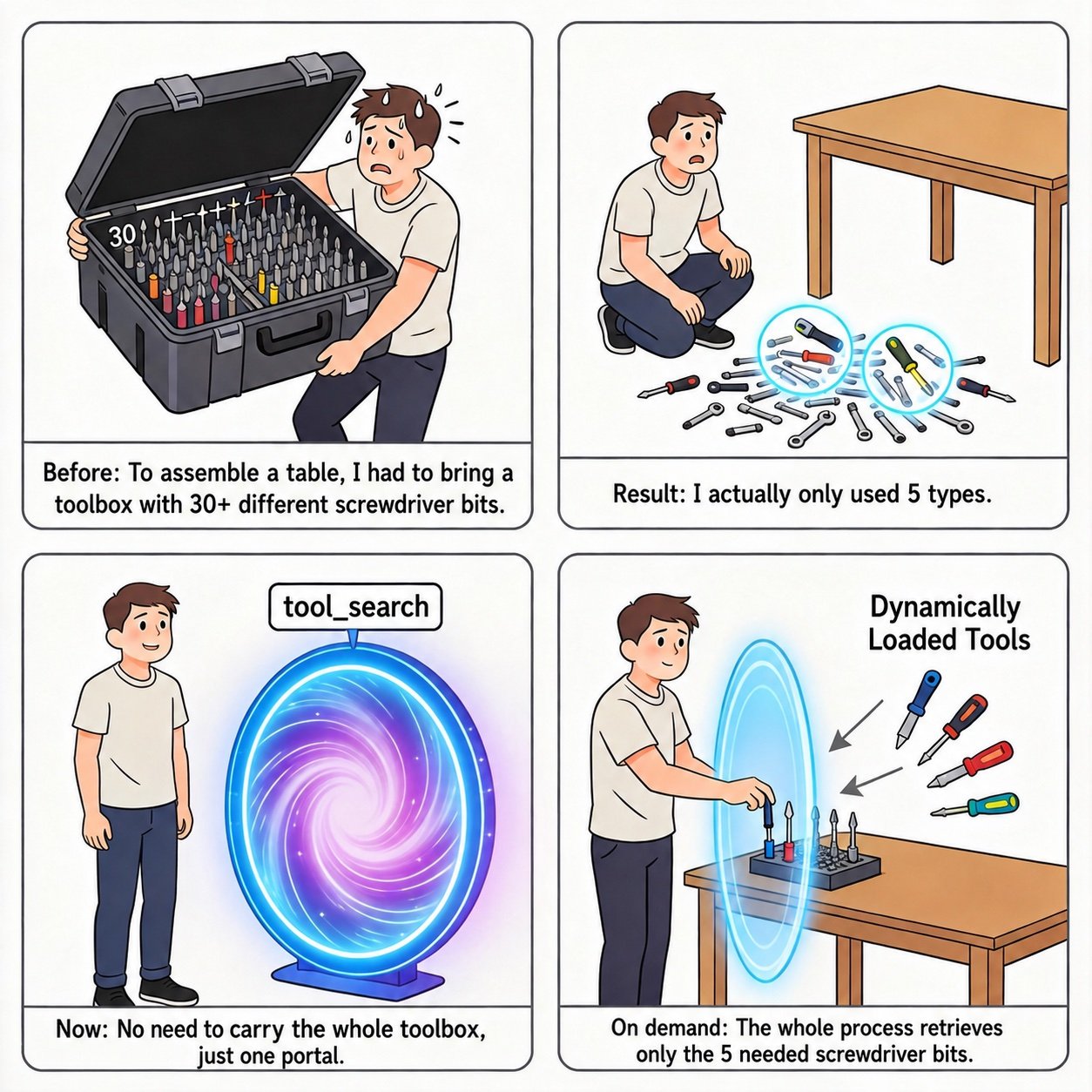
When your application needs a large number of tools, declaring all of them up front in the top-level `tools` field of every request leads to **Tool Definition Bloat**: every request carries the descriptions and parameter schemas of all tools, driving up token usage, and the more candidate tools there are, the more likely the model picks the wrong tool or constructs invalid call arguments.
Dynamically Loaded Tools let you **inject tools on demand** during a conversation: start with only a few core tools, and insert additional tools into `messages` when the conversation actually needs them — reducing token usage and improving tool-selection accuracy at the same time. For the reasoning behind this design (lazy loading, tool registry) and combined practices, see [Kimi K3 API Tool Calling Best Practices](/guide/kimi-k3-tool-calling-best-practice).
 ## Inject tool declarations into messages
Insert a message with `role` set to `system` into `messages`, and declare the tools to load through that message's `tools` field. The declaration format is identical to the top-level `tools` field of the request, and must contain the **complete** tool definition (`name`, `description`, `parameters`):
```json theme={null}
{
"messages": [
{
"role": "system",
"content": "You are a helpful assistant."
},
{
"role": "user",
"content": "Calculate fuel consumption."
},
{
"role": "system",
"tools": [
{
"type": "function",
"function": {
"name": "Calculator",
"description": "A calculator that evaluates a single arithmetic expression",
"parameters": {
"type": "object",
"properties": {
"expr": {
"type": "string",
"description": "An arithmetic expression in JavaScript syntax; supports basic arithmetic, exponentiation, logarithms, and trigonometric functions"
}
},
"required": ["expr"]
}
}
}
]
}
]
}
```
A few things to know:
* A `system` message carrying `tools` has the **same standing as ordinary input messages**: the tools become visible to the model starting from the position where the message appears in the `messages` list;
* Dynamically loaded tools **coexist** with the global tools declared in the top-level `tools` field — the model can see both;
* A dynamically injected tool declaration must be a **complete** tool definition; you cannot pass only a tool name or reference a tool already declared globally.
```bash theme={null}
$ curl https://api.moonshot.ai/v1/chat/completions \
-H "Content-Type: application/json" \
-H "Authorization: Bearer $MOONSHOT_API_KEY" \
-d '{
"model": "kimi-k3",
"messages": [
{
"role": "system",
"content": "You are a helpful assistant."
},
{
"role": "user",
"content": "Help me compute 23 * 47."
},
{
"role": "system",
"tools": [
{
"type": "function",
"function": {
"name": "Calculator",
"description": "A calculator that evaluates a single arithmetic expression",
"parameters": {
"type": "object",
"properties": {
"expr": {
"type": "string",
"description": "An arithmetic expression in JavaScript syntax; supports basic arithmetic, exponentiation, logarithms, and trigonometric functions"
}
},
"required": ["expr"]
}
}
}
]
}
]
}'
```
```python theme={null}
import os
from openai import OpenAI
client = OpenAI(
api_key=os.environ["MOONSHOT_API_KEY"],
base_url="https://api.moonshot.ai/v1",
)
completion = client.chat.completions.create(
model="kimi-k3",
messages=[
{"role": "system", "content": "You are a helpful assistant."},
{"role": "user", "content": "Help me compute 23 * 47."},
# Dynamically load tools: insert a system message carrying a tools field
{
"role": "system",
"tools": [
{
"type": "function",
"function": {
"name": "Calculator",
"description": "A calculator that evaluates a single arithmetic expression",
"parameters": {
"type": "object",
"properties": {
"expr": {
"type": "string",
"description": "An arithmetic expression in JavaScript syntax; supports basic arithmetic, exponentiation, logarithms, and trigonometric functions",
}
},
"required": ["expr"],
},
},
}
],
},
],
)
print(completion.choices[0].message.tool_calls)
```
## Implementing tool search with dynamic loading
There is no dedicated tool-search API. If you have a large tool inventory, you can implement tool search yourself by combining a **custom search tool with dynamically loaded tools**:
1. Declare only a single `search_tools` function in the top-level `tools` field, implemented by your backend, which returns matching tool names and summaries for a given keyword;
2. In the system prompt, advertise the searchable keywords (e.g. a tool catalog or domain tags) so the model knows to call `search_tools` first when it needs a tool;
3. Based on what `search_tools` returns, your application inserts the **full declarations** of the matching tools into `messages` via a `system` message carrying a `tools` field;
4. The model can then call these newly loaded tools in subsequent generations.
No matter how large the total tool inventory is, each request then only carries a handful of tool declarations, keeping both the context window and the model's selection pressure under control.
## Notes
* Dynamic tool declarations apply per request and are not retained by the server. The client decides whether to include them again in the next request:
* **Keep the declaration**: the tool remains available, and the unchanged prefix is more likely to hit the cache;
* **Omit the declaration**: the declaration no longer applies. If the tool is not declared elsewhere, the model cannot call that tool. Because `messages` has changed, the prefix after that point may miss the cache.
* Dynamic tool declarations use **exactly the same format** as global `tools` declarations — you maintain a single schema, keeping migration cheap;
* Appending a dynamic tool declaration to the end of `messages` does not affect the cached prefix. Removing or modifying an earlier tool declaration may affect cache hits after the point of change. Declaring global tools in the top-level `tools` field does not affect cache hits either;
* A `system` message carrying `tools` also consumes context length, so only inject the tools the current conversation genuinely needs;
* Dynamically loaded tools are currently supported only on `kimi-k3`; on other models (e.g. `kimi-k2.6`) the request fails with a `tokenization failed` error;
* A `system` message carrying `tools` must not also carry a `content` field, otherwise the request fails with a 400 error (`cannot be used with content`); with the OpenAI SDK you can pass the `tools` field through directly in `messages` — no `extra_body` needed.
## Related reading
* [Kimi K3 API Tool Calling Best Practices](/guide/kimi-k3-tool-calling-best-practice): combined practices for dynamic loading, tool\_choice, and thinking effort
* [Tool Choice](/guide/use-tool-choice): constrain the model's tool-calling behavior with `tool_choice`
* [Use Kimi API for Tool Calls](/guide/use-kimi-api-to-complete-tool-calls): the complete tool-calling workflow and examples
* [Model Parameter Reference](/api/models-overview): per-model support for parameters such as `tool_choice`
## Inject tool declarations into messages
Insert a message with `role` set to `system` into `messages`, and declare the tools to load through that message's `tools` field. The declaration format is identical to the top-level `tools` field of the request, and must contain the **complete** tool definition (`name`, `description`, `parameters`):
```json theme={null}
{
"messages": [
{
"role": "system",
"content": "You are a helpful assistant."
},
{
"role": "user",
"content": "Calculate fuel consumption."
},
{
"role": "system",
"tools": [
{
"type": "function",
"function": {
"name": "Calculator",
"description": "A calculator that evaluates a single arithmetic expression",
"parameters": {
"type": "object",
"properties": {
"expr": {
"type": "string",
"description": "An arithmetic expression in JavaScript syntax; supports basic arithmetic, exponentiation, logarithms, and trigonometric functions"
}
},
"required": ["expr"]
}
}
}
]
}
]
}
```
A few things to know:
* A `system` message carrying `tools` has the **same standing as ordinary input messages**: the tools become visible to the model starting from the position where the message appears in the `messages` list;
* Dynamically loaded tools **coexist** with the global tools declared in the top-level `tools` field — the model can see both;
* A dynamically injected tool declaration must be a **complete** tool definition; you cannot pass only a tool name or reference a tool already declared globally.
```bash theme={null}
$ curl https://api.moonshot.ai/v1/chat/completions \
-H "Content-Type: application/json" \
-H "Authorization: Bearer $MOONSHOT_API_KEY" \
-d '{
"model": "kimi-k3",
"messages": [
{
"role": "system",
"content": "You are a helpful assistant."
},
{
"role": "user",
"content": "Help me compute 23 * 47."
},
{
"role": "system",
"tools": [
{
"type": "function",
"function": {
"name": "Calculator",
"description": "A calculator that evaluates a single arithmetic expression",
"parameters": {
"type": "object",
"properties": {
"expr": {
"type": "string",
"description": "An arithmetic expression in JavaScript syntax; supports basic arithmetic, exponentiation, logarithms, and trigonometric functions"
}
},
"required": ["expr"]
}
}
}
]
}
]
}'
```
```python theme={null}
import os
from openai import OpenAI
client = OpenAI(
api_key=os.environ["MOONSHOT_API_KEY"],
base_url="https://api.moonshot.ai/v1",
)
completion = client.chat.completions.create(
model="kimi-k3",
messages=[
{"role": "system", "content": "You are a helpful assistant."},
{"role": "user", "content": "Help me compute 23 * 47."},
# Dynamically load tools: insert a system message carrying a tools field
{
"role": "system",
"tools": [
{
"type": "function",
"function": {
"name": "Calculator",
"description": "A calculator that evaluates a single arithmetic expression",
"parameters": {
"type": "object",
"properties": {
"expr": {
"type": "string",
"description": "An arithmetic expression in JavaScript syntax; supports basic arithmetic, exponentiation, logarithms, and trigonometric functions",
}
},
"required": ["expr"],
},
},
}
],
},
],
)
print(completion.choices[0].message.tool_calls)
```
## Implementing tool search with dynamic loading
There is no dedicated tool-search API. If you have a large tool inventory, you can implement tool search yourself by combining a **custom search tool with dynamically loaded tools**:
1. Declare only a single `search_tools` function in the top-level `tools` field, implemented by your backend, which returns matching tool names and summaries for a given keyword;
2. In the system prompt, advertise the searchable keywords (e.g. a tool catalog or domain tags) so the model knows to call `search_tools` first when it needs a tool;
3. Based on what `search_tools` returns, your application inserts the **full declarations** of the matching tools into `messages` via a `system` message carrying a `tools` field;
4. The model can then call these newly loaded tools in subsequent generations.
No matter how large the total tool inventory is, each request then only carries a handful of tool declarations, keeping both the context window and the model's selection pressure under control.
## Notes
* Dynamic tool declarations apply per request and are not retained by the server. The client decides whether to include them again in the next request:
* **Keep the declaration**: the tool remains available, and the unchanged prefix is more likely to hit the cache;
* **Omit the declaration**: the declaration no longer applies. If the tool is not declared elsewhere, the model cannot call that tool. Because `messages` has changed, the prefix after that point may miss the cache.
* Dynamic tool declarations use **exactly the same format** as global `tools` declarations — you maintain a single schema, keeping migration cheap;
* Appending a dynamic tool declaration to the end of `messages` does not affect the cached prefix. Removing or modifying an earlier tool declaration may affect cache hits after the point of change. Declaring global tools in the top-level `tools` field does not affect cache hits either;
* A `system` message carrying `tools` also consumes context length, so only inject the tools the current conversation genuinely needs;
* Dynamically loaded tools are currently supported only on `kimi-k3`; on other models (e.g. `kimi-k2.6`) the request fails with a `tokenization failed` error;
* A `system` message carrying `tools` must not also carry a `content` field, otherwise the request fails with a 400 error (`cannot be used with content`); with the OpenAI SDK you can pass the `tools` field through directly in `messages` — no `extra_body` needed.
## Related reading
* [Kimi K3 API Tool Calling Best Practices](/guide/kimi-k3-tool-calling-best-practice): combined practices for dynamic loading, tool\_choice, and thinking effort
* [Tool Choice](/guide/use-tool-choice): constrain the model's tool-calling behavior with `tool_choice`
* [Use Kimi API for Tool Calls](/guide/use-kimi-api-to-complete-tool-calls): the complete tool-calling workflow and examples
* [Model Parameter Reference](/api/models-overview): per-model support for parameters such as `tool_choice`