

Overview of Kimi K2.6 Model
Kimi K2.6 is Kimi’s general-purpose model, possessing stronger and more stable long-term code writing capabilities, significantly improved instruction compliance and self-correction capabilities, and the ability to handle more complex software engineering tasks. It also significantly enhances the autonomous execution capabilities of the Agent. It supports text, image, and video input, thinking and non-thinking modes, and dialogue and Agent tasks. Tech Blog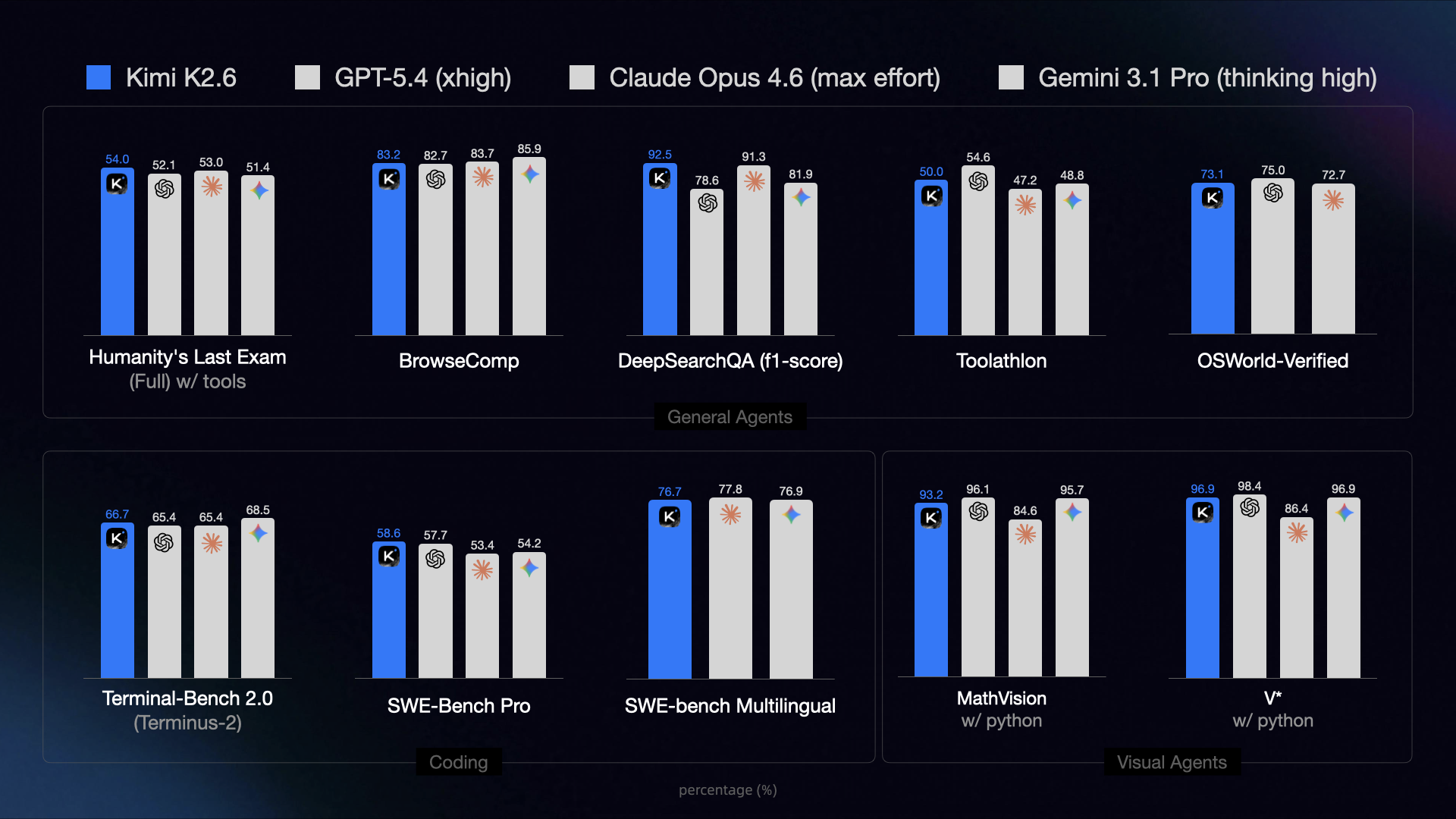
Long-horizon coding capability breakthrough
- K2.6 has achieved a breakthrough in long-horizon coding tasks, demonstrating more reliable generalization across diverse programming languages (such as Rust, Go, and Python) and task scenarios (including frontend development, DevOps, and performance optimization).
Ultra-Long Context Support
kimi-k2.7-codeandkimi-k2.6models both provide a 256K context window.
Long-Thinking Capabilities
- Kimi K2.6 still has strong reasoning capabilities, supporting multi-step tool invocation and reasoning, excelling at solving complex problems, such as complex logical reasoning, mathematical problems, and code writing.
Example Usage
Here is a complete usage example to help you quickly get started with the Kimi K2.6 model.Install the OpenAI SDK
Kimi API is fully compatible with OpenAI’s API format. You can install the OpenAI SDK as follows:Verify the Installation
Quick Start
- Try it now: Test model performance in your business scenarios through interactive operations in the Dev Workbench
- Apply for API Key: Test via API call immediately
Image Understanding Code Example
Video Understanding Code Example
Multimodal Tool Capability Example
Kimi K2.6 model combines multiple capabilities. The following example demonstrates K2.6’s visual understanding + tool calling capabilities. First, download this sample video to your local machine, such as~/Download/test_video.mp4
Best Practices
Supported Formats
Images are supported in formats: png, jpeg, webp, gif.Videos are supported in formats: mp4, mpeg, mov, avi, x-flv, mpg, webm, wmv, 3gpp.
Token Calculation and Billing
Image and video token usage is dynamically calculated. You can use the token estimation API to check the expected token consumption for a request containing images or video before processing. Generally, the higher the resolution of an image, the more tokens it will consume. For videos, the number of tokens depends on the number of keyframes and their resolution—the more keyframes and the higher their resolution, the greater the token consumption. The Vision model is billed based on the total number of tokens processed. For more information, see: For token pricing details, refer to Model Pricing.Recommended Resolution
We recommend that image resolution should not exceed 4k (4096×2160), and video resolution should not exceed FHD (1920×1080). Higher resolutions will only increase processing time and will not improve the model’s understanding.Upload File or Base64?
Due to the limitation on the overall size of the request body, for very large videos you must use the file upload method to utilize vision capabilities.For images or videos that will be referenced multiple times, it is recommended to use the file upload method. Regarding file upload limitations, please refer to the File Upload documentation. Image quantity limit: The Vision model has no limit on the number of images, but ensure that the request body size does not exceed 100M URL-formatted images: Not supported, currently only supports base64-encoded image contentParameters Differences in Request Body
Parameters are listed in chat. However, behaviour of some parameters may be different in k2.6 models. We recommend using the default values instead of manually configuring these parameters. Differences are listed below.Tool Use Compatibility
When using tools, if the thinking parameter is set to{"type": "enabled"}, please note the following constraints to ensure model performance:
tool_choicecan only be set to “auto” or “none” (default is “auto”) to avoid conflicts between reasoning content and the specified tool_choice. Any other value will result in an error;- During multi-step tool calling, we recommend keeping the
reasoning_contentfrom the assistant message in the current turn’s tool call within the context; omitting it does not cause an error, but may degrade reasoning continuity and tool-call quality; - The official builtin
$web_searchtool is temporarily incompatible with Kimi K2.6 thinking mode, you can choose to disable thinking mode first and then use the$web_searchtool.
Disable Thinking Capability Example
For thekimi-k2.6 model, you can disable thinking by specifying "thinking": {"type": "disabled"} in the request body:
- curl
- python
Model Pricing
For token pricing details, refer to Model Pricing.Learn More
- For the benchmark testing with Kimi K2.6, please refer to this benchmark best practice
- For the most detailed API usage example of Kimi K2.6, see: Vision Input
- See how to use Kimi K2 in Claude Code
- Learn how to configure and use the Thinking Mode
- Web search is a powerful official tool provided by the Kimi API. See how to use Web Search and other official tools.
- For all model pricing see here, Billing & Rate Limit details, and Web Search Pricing