

Overview
We’re introducing Kimi K3.1 Pro, the first model in our new K3.1 series and our most capable 3T-class open-weight model to date, with a 1-million-token context window. It delivers substantial improvements across coding, 3D creation, financial research, and other agentic capabilities. We are also releasing Kimi K3.1 Pro Highspeed, which delivers 2-3× the speed of K3.1 Pro for more responsive interactions. The full model weights will be released by Nov 4.Advancing the Frontier of Open Intelligence
Kimi K3.1 Pro is a post-trained version of Kimi K3, with substantially larger post-training compute. To enable large-scale joint RL across hundreds of downstream domains, we optimized every layer of the stack — the RL framework, long-context inference, training efficiency, sandbox infrastructure, rollout scheduling, and a shared platform for environment quality checks — so that each increment of RL compute delivers stable, predictable returns. As a result, K3.1 Pro achieves consistent gains in every domain.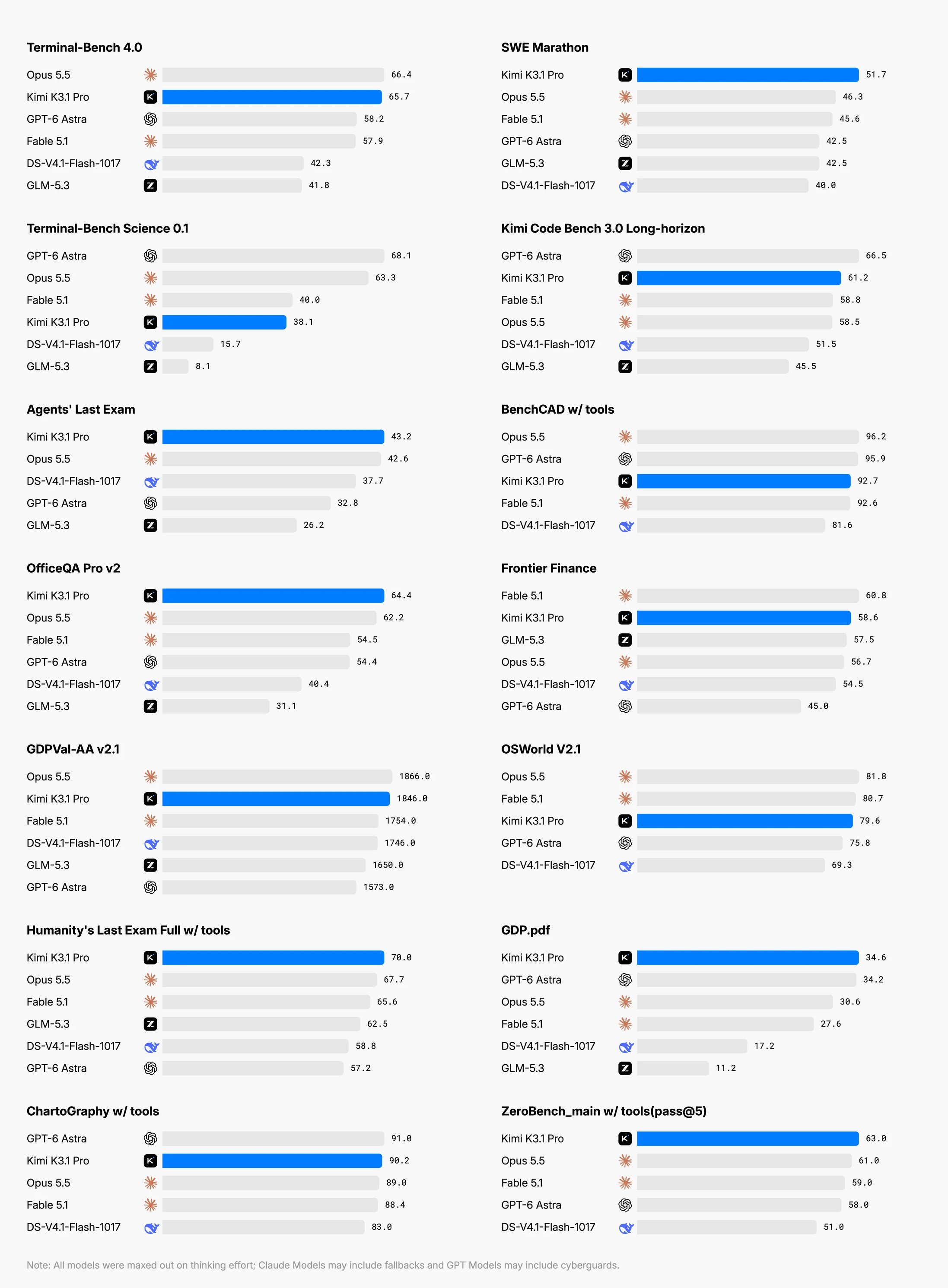
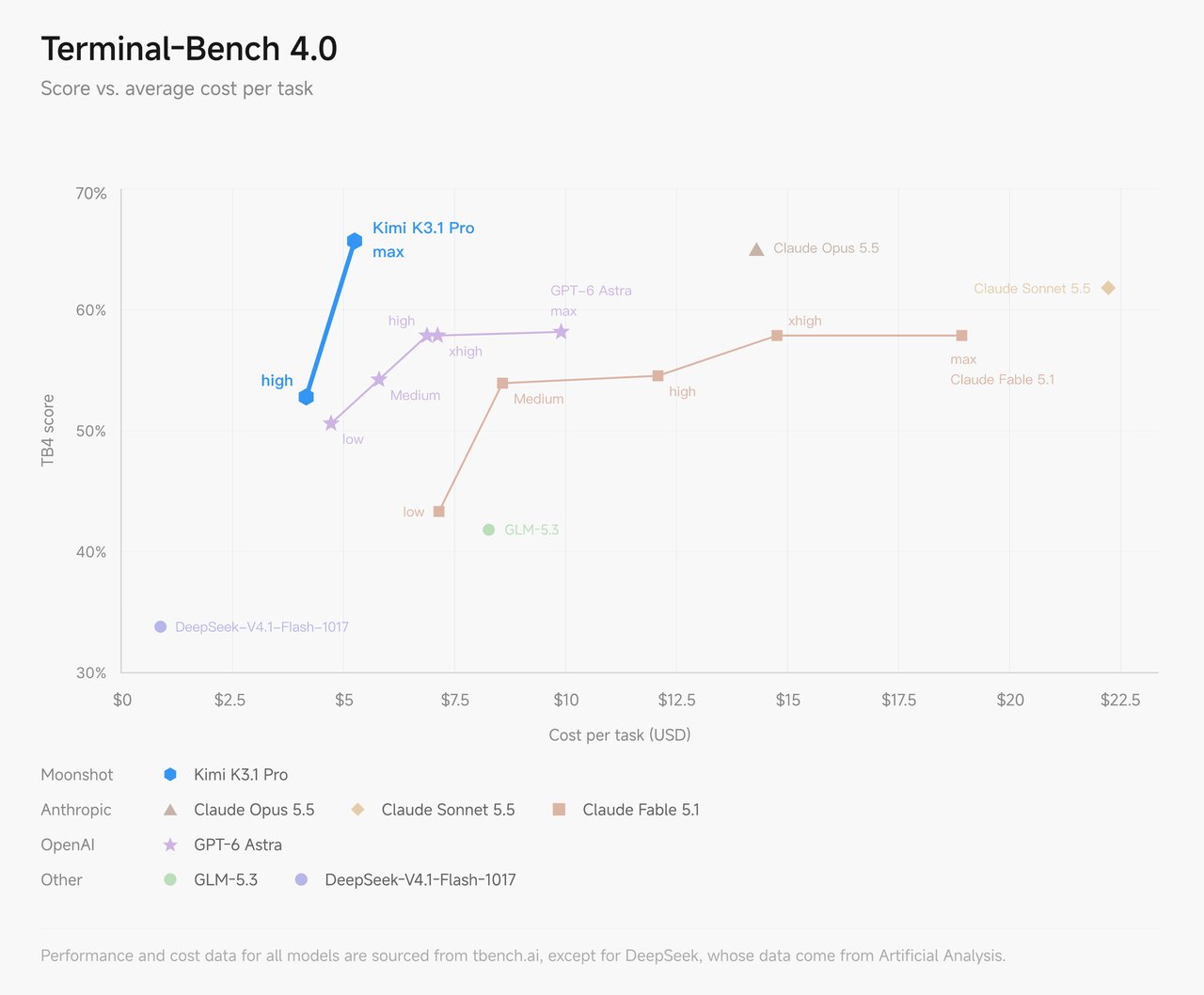
Coding
K3.1 Pro covers the full range of coding work, from quick fixes in real codebases to full-project builds. It also brings a more considered visual style to games and web experiences, and knows how to build them with the right tools. K3.1 Pro works effectively across game engines such as Unity, Unreal Engine, and Godot, combining them with web search and 3D generation to create complete experiences. Its front-end pages, interactive Three.js scenes, and 3D assets show stronger composition, typography, animation, and polish. The examples below were created end to end by K3.1 Pro:
K3.1 Pro’s long-horizon coding capabilities are also strengthened through large-scale reinforcement learning. In one internal test, it built a human walking dynamics simulator with integrated training and evaluation pipelines on top of human-atlas, an open-source anatomical model of the human body comprising 296 skeletal components, including cartilage, and 402 muscle components. Across 167 missions and 420 independent reviews, it analyzed experimental results, diagnosed problems, and iteratively refined the walking controller, enabling the simulated human to go from collapsing within seconds to walking continuously with alternating strides for 11.2 seconds. When reward shaping failed to improve arm motion, K3.1 Pro did not simply keep adjusting the reward: it ran open-loop probes of the simulator’s dynamics, identified and corrected 36 errors in shoulder-muscle moment-arm calculations, and then retrained the controller.
3D Modeling and Design
K3.1 Pro is strong at 3D creation and spatial reasoning. From a text brief, sketch, or reference image, it can infer a subject’s shape, proportions, and spatial relationships, then reconstruct it as a usable 3D model. It also has a stronger understanding of existing asset libraries and model collections.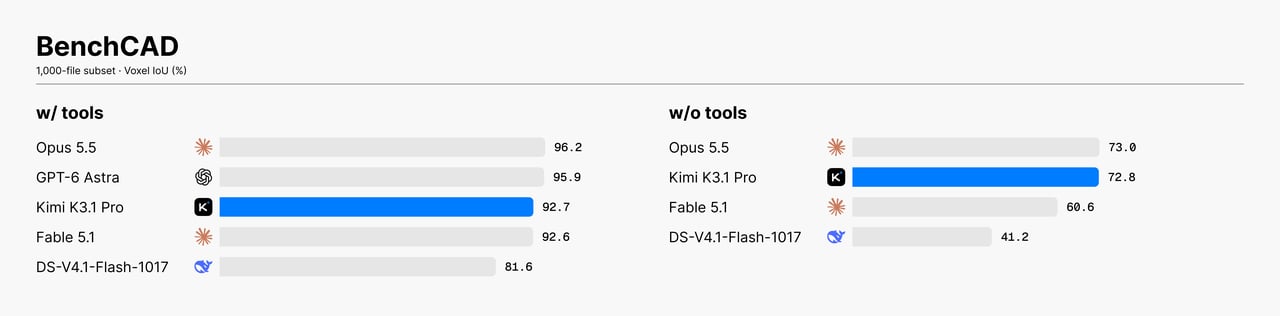
Finance
With stronger reasoning and agentic capability, K3.1 Pro is capable of end-to-end delivery of complete financial workflows. K3.1 Pro achieves state-of-the-art results on OfficeQA Pro v2 and SpreadsheetBench v2. OfficeQA Pro v2 tests complex fiscal data analysis over real financial documents through retrieval, cross-document verification, and multi-step numerical reasoning. SpreadsheetBench v2 evaluates end-to-end spreadsheet workflows including financial modeling, cross-sheet formula dependencies, and error diagnosis. K3.1 Pro also improves over K3 on Frontier Finance, which measures support for complete investment workflows from screening to profitability analysis.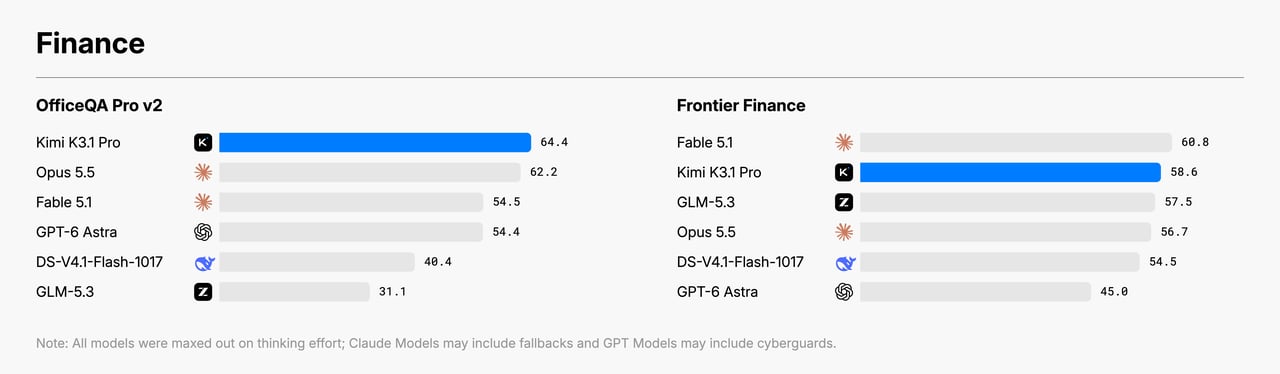
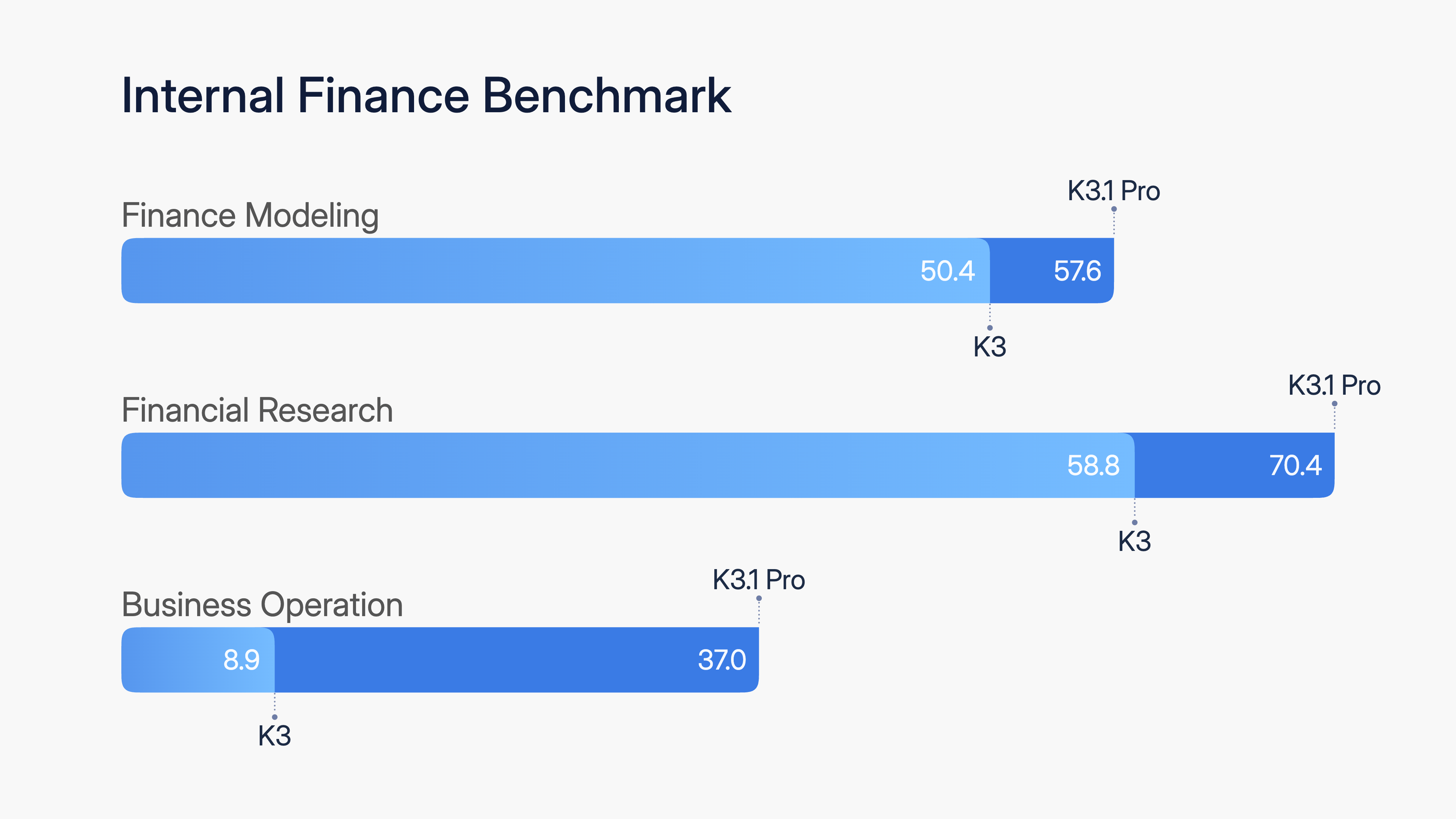
- Financial Modeling evaluates formula linkage, financial logic, and final workbook quality in real-world modeling tasks. K3.1 Pro improves on K3 by 7.2 points.
- Financial Research evaluates whether models can produce auditable research under evidence and cutoff constraints. K3.1 Pro improves on K3 by 11.6 points.
- Business Operation measures long-horizon management and decision-making in a simulated business environment. K3.1 Pro achieves about 4.2× K3’s performance.
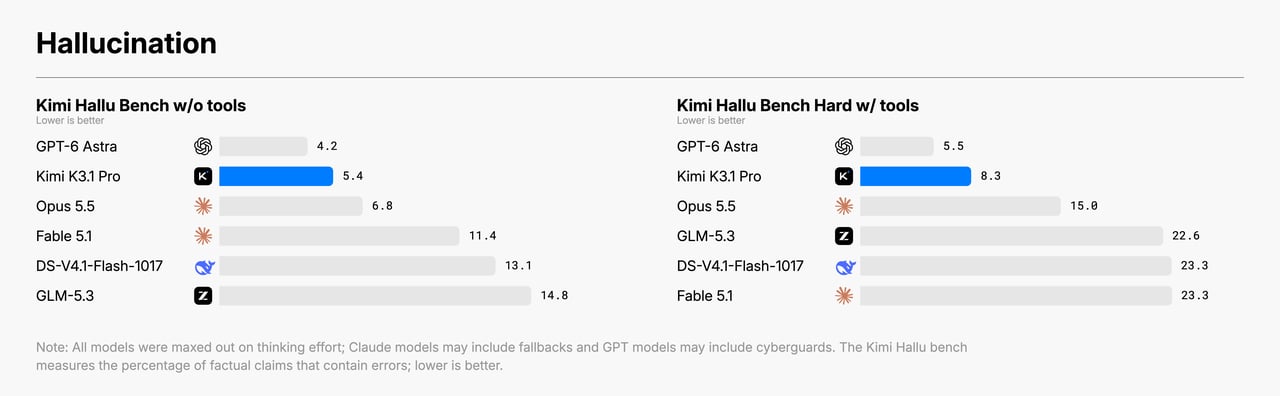
Cyber Security
As K3.1 Pro became more capable, we spent a correspondingly larger share of our effort understanding where cyber capability comes from, and how much of it we can control. We therefore analyzed and evaluated K3.1 Pro’s vulnerability research capabilities, and applied targeted controls during training to reduce potential misuse risk while preserving general usefulness. Identifying and removing cyber-related data . During development, we observed vulnerability research performance improving steadily as post-training scaled. Tracing the source of this trend, we found that cyber-related content was embedded within the general mid-training corpus, and cyber-related tasks were present in the RL environment mix — a natural byproduct of training on broad data. In preliminary experiments on internal models, we found that without data removal at either the mid-training or the RL stage, downstream cyber capability would increase substantially. These findings gave us a concrete lever for control. For the open-weight release of K3.1 Pro, we identified and removed cyber-related data from both training stages, while retaining the general-purpose coding tasks needed for model usefulness. We will continue to apply appropriate controls at every training stage, of which cyber-related data identification and restriction is one example. Evaluation and results . After data cleaning, we evaluated K3.1 Pro on xdev-bench-hard, our in-house benchmark of expert-curated, source-code-based vulnerability discovery and exploitation tasks, calibrated to provide meaningful differentiation at our current capability level. Most tasks faithfully reproduce recently disclosed vulnerabilities in software such as the Linux kernel, Node.js, JavaScriptCore, Exim, and VirGL, with mitigations enabled. Each task provides the vulnerable source code, a short bug hint, and the corresponding binary; the agent must develop an exploit, achieve arbitrary code execution in a separate sandbox, and retrieve a secret string for automated verification. We report pass@3 over a random subset of runs, with no hard timeouts or output token limits.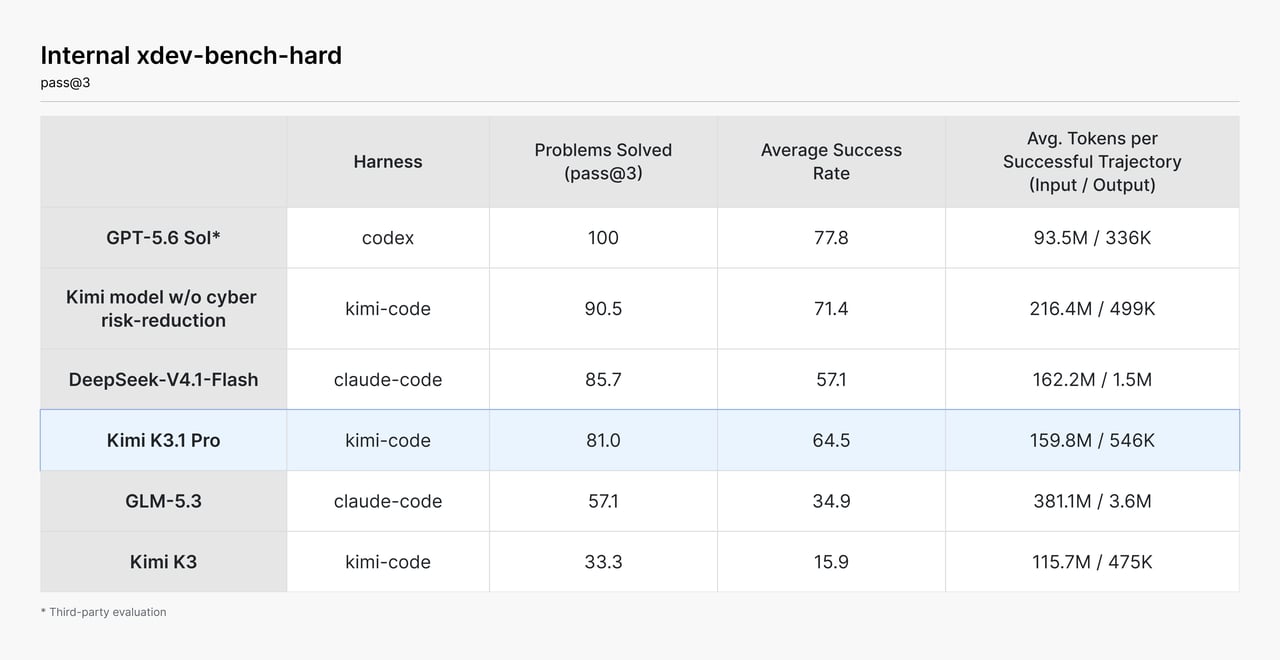
For the full technical report and more examples, see the Kimi K3.1 Pro tech blog.
Access requirements
Kimi K3.1 Pro is a flagship model: it is unlocked after a successful top-up (minimum $1). Your cumulative top-up amount also determines your account tier and rate limits (concurrency, RPM, TPM, TPD) — see Recharge and Rate Limits.Get started
The examples require Python 3.9+ and the OpenAI SDK. Install the SDK and initialize the client once; later Python examples reuseclient.
Basic call
K3.1 Pro also has a high-speed variant,
kimi-k3.1-pro-highspeed. See Model Pricing for model IDs and prices.- Python
- cURL
Reasoning effort
K3.1 Pro always has thinking mode enabled and supports configuring its reasoning effort with the top-levelreasoning_effort request field. Reasoning effort supports low, high, and max (default max). See Reasoning Effort for usage.
content.
Streaming
Streaming responses provide separatereasoning_content and final-answer content deltas. See Streaming Output for details.
Vision input
For vision messages,content must be an array of objects, not a serialized string. See Vision Input for formats and limits.
- Local image
- Video file
Structured output
Usejson_schema with strict: true to constrain the final message.content. Parse only that field, not reasoning_content.
Name and age schema
Name and age schema
Partial Mode
Add an assistant message withpartial=True at the end of messages to continue from a text prefix. Prepend that prefix when displaying the final result.
Custom tools and tool_choice
Use tool_choice="required" on the first turn to require at least one tool call. After executing every call, return the complete assistant message and append one tool result with the matching tool_call_id for each call.
Minimal weather agent loop
Minimal weather agent loop
Dynamic tool loading
Place a complete tool definition in asystem message without content. The tool becomes available from that message onward.
Load a calculator dynamically
Load a calculator dynamically
- Include the complete
name,description, andparametersdefinition. - The declaration takes effect at its position in
messages. - Keep this message in later request history; the server does not retain it.
1M context and TTL caching
Context caching is automatic for regular model requests — no manual cache creation: once an eligible prefix is written to the cache, hits are billed at the cached-input price, and each write incurs a one-time charge. TTL supports two values,5m (default) and 1h; choose one based on your request interval — the default 5m is enough for rapid back-and-forth, while workloads with gaps over 5 minutes should pass prompt_cache_options.ttl to select the 1h tier and avoid repeated writes after expiry. The cache is stored in blocks; any partial block that does not fill a whole block cannot be written to the cache and is billed as a cache miss.
Official tools
Official tools are integrated through Formula:- Fetch tool definitions from the Formula
/toolsendpoint. - Add those definitions to the Chat Completions
toolsfield. - When the model returns
tool_calls, submit each function name and arguments to the Formula/fibersendpoint. - Add the complete assistant message and Fiber output as the corresponding tool message.
- Call Chat Completions again until the model returns a final answer.
Important limits
- Reasoning effort is configured with the top-level
reasoning_effortrequest field and supportslow,high, andmax(defaultmax); K3.1 Pro always has thinking mode enabled. max_completion_tokensdefaults to 131072 and can be set up to 1048576.temperature=1.0,top_p=0.95,n=1,presence_penalty=0, andfrequency_penalty=0are fixed; omit them from requests.- Return the complete assistant message unchanged in multi-turn conversations and tool calls.
- Vision input does not support public image URLs. Use base64 or
ms://<file-id>, and makecontentan array of objects. - Web search is being updated and is not recommended for production workflows in the near term.
FAQ
How is Kimi K3.1 Pro billed?
How is Kimi K3.1 Pro billed?
Kimi K3.1 Pro offers a 1M-token context and uses flat pay-as-you-go pricing — there is no tiering by context length. Billable items include cache writes (with separate TTL 5min and TTL 1h tiers), input (with separate rates for cache hits and misses), and output, all billed at uniform per-token prices. See Kimi K3.1 Pro pricing.
How do I turn off Kimi K3.1 Pro's chain-of-thought?
How do I turn off Kimi K3.1 Pro's chain-of-thought?
You can’t — K3.1 Pro always thinks. If the reasoning takes too long, set
reasoning_effort to low to reduce the reasoning effort. See Reasoning Effort.Model Pricing
For token pricing details, refer to Model Pricing.Related docs
Reasoning Effort
Configure reasoning_effort.
Vision Input
Send images and videos.
Structured Output
Use strict JSON Schema.
Partial Mode
Continue from a prefix.
Tool Choice
Control whether the model calls tools.
Dynamic Tool Loading
Inject tool definitions on demand.
Tool Calling Best Practices
Combine tool-calling features.
Official Tools
Integrate Formula tools.
Kimi K3.1 Pro Pricing
Review input and output prices.