

Overview
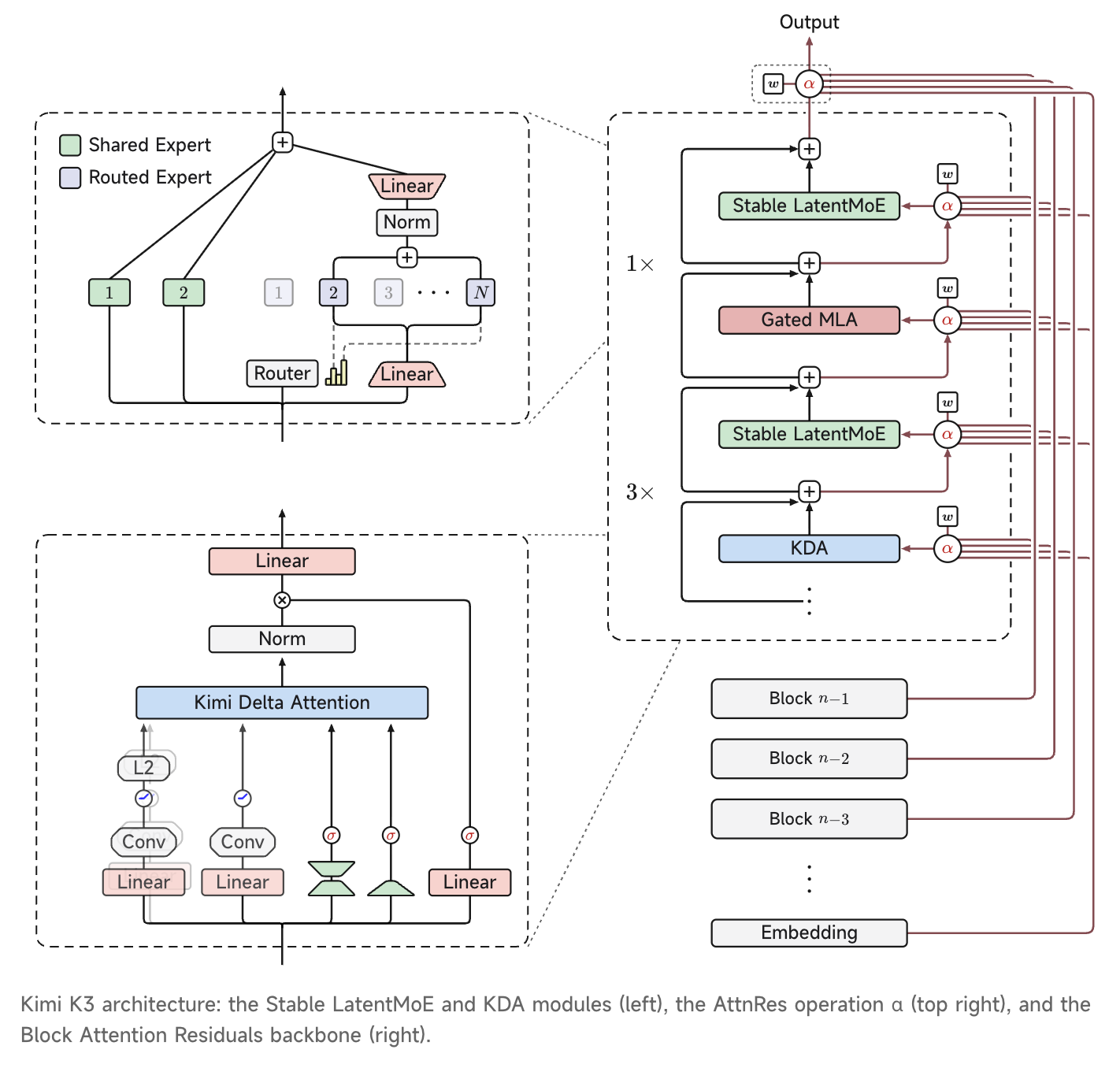
Kimi K3 is Kimi’s previous-generation flagship model, with 2.8 trillion parameters. It is built on Kimi Delta Attention (KDA), a hybrid linear attention mechanism, and Attention Residuals, with native visual understanding and a 1M-token context window. It is the world’s first open-source model in the 3-trillion-parameter class, designed for frontier intelligence scenarios including long-horizon coding, knowledge work, and reasoning. For complete benchmarks and case studies, see the technical blog. Kimi is currently working closely with inference partners and open-source maintainers to align technical details and ensure the model launches reliably across the ecosystem. The full model weights have been released. More details on architecture, training, and evaluation will be published with the Kimi K3 technical report.A 3-trillion-scale open-source model
Kimi K3 is the first open-source model to reach 2.8 trillion parameters. This is the latest step in Kimi’s continued push of model-scale boundaries: in 9 of the past 12 months (2025/07–2026/07), Kimi models have maintained the frontier in open-source model scale.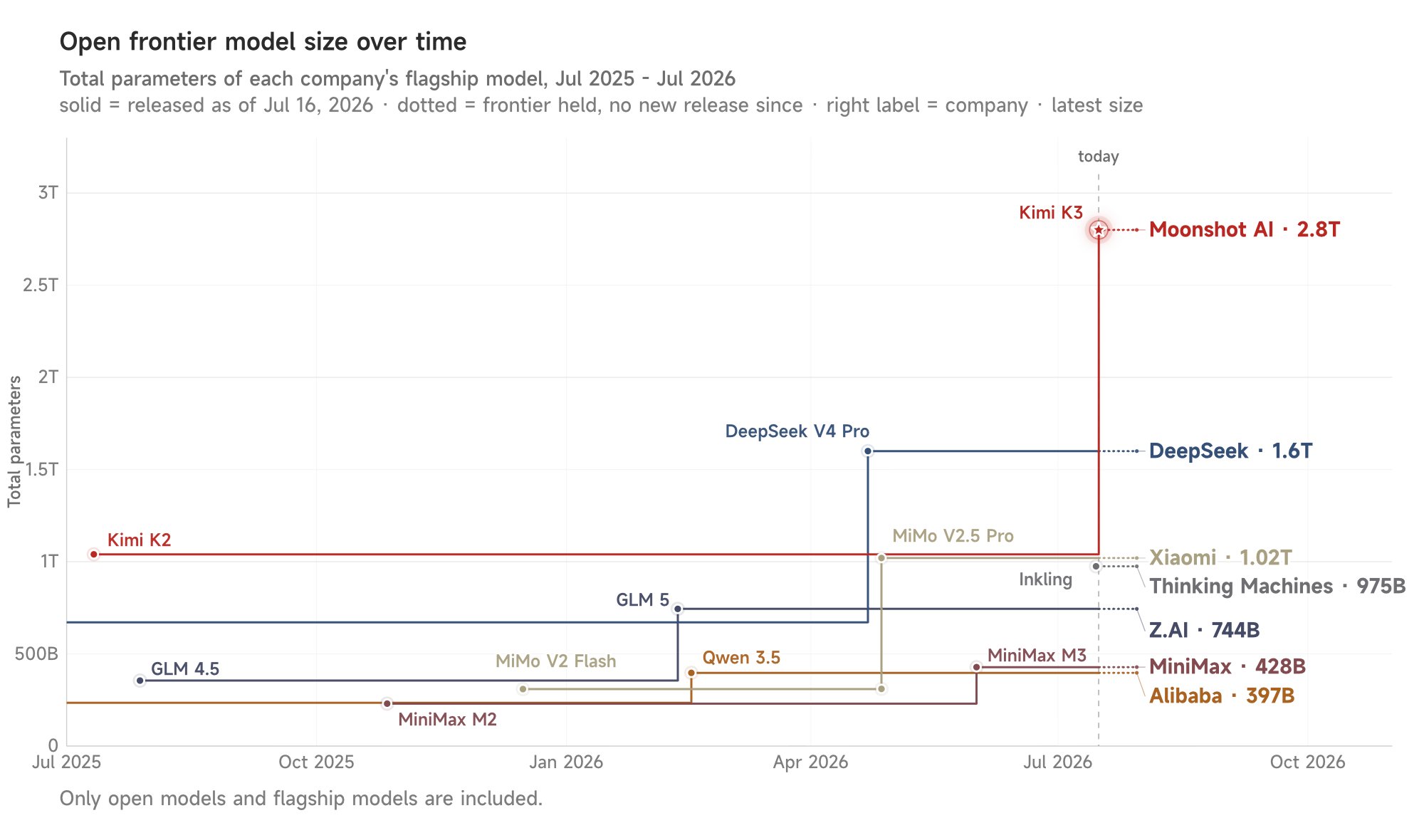
Coding
Kimi K3 has strong long-horizon coding capabilities. With minimal human supervision, it can sustain long-running engineering tasks, understand and work with large codebases, and coordinate terminal tools. Kimi K3 also excels at tasks that combine software engineering and visual reasoning. It can use screenshots and visual feedback to improve workflows in game development, frontend engineering, CAD, and related scenarios.Knowledge work
Kimi K3 advances end-to-end knowledge work. Beyond public benchmarks, Kimi K3 (max) also shows consistent gains in our internal evaluations. These evaluations reflect recurring task patterns and challenges from real user-agent collaboration workflows. Kimi K3 demonstrates consistent advantages across production-oriented workflows, indicating broad improvements in agentic knowledge-work capabilities.Access requirements
Kimi K3 is a flagship model: it is unlocked after a successful top-up (minimum $1). Your cumulative top-up amount also determines your account tier and rate limits (concurrency, RPM, TPM, TPD) — see Recharge and Rate Limits.Get started
The examples require Python 3.9+ and the OpenAI SDK. Install the SDK and initialize the client once; later Python examples reuseclient.
Basic call
- Python
- cURL
Reasoning effort
K3 always has thinking mode enabled and supports configuring its reasoning effort with the top-levelreasoning_effort request field.
Reasoning effort supports
low, high, and max (default max). See Reasoning Effort for usage.For multi-turn conversations and tool calls, add the complete assistant message returned by the API to the next request. Do not keep only
content.Streaming
Streaming responses provide separatereasoning_content and final-answer content deltas. See Streaming Output for details.
Vision input
For vision messages,content must be an array of objects, not a serialized string. See Vision Input for formats and limits.
- Local image
- Video file
Structured output
Usejson_schema with strict: true to constrain the final message.content. Parse only that field, not reasoning_content.
Name and age schema
Name and age schema
Partial Mode
Add an assistant message withpartial=True at the end of messages to continue from a text prefix. Prepend that prefix when displaying the final result.
Custom tools and tool_choice
Use tool_choice="required" on the first turn to require at least one tool call. After executing every call, return the complete assistant message and append one tool result with the matching tool_call_id for each call.
Minimal weather agent loop
Minimal weather agent loop
Dynamic tool loading
Place a complete tool definition in asystem message without content. The tool becomes available from that message onward.
Load a calculator dynamically
Load a calculator dynamically
- Include the complete
name,description, andparametersdefinition. - The declaration takes effect at its position in
messages. - Keep this message in later request history; the server does not retain it.
1M context and TTL caching
Context caching is automatic for regular model requests — no manual cache creation: once an eligible prefix is written to the cache, hits are billed at the cached-input price, and each write incurs a one-time charge. TTL supports two values,5m (default) and 1h; choose one based on your request interval — the default 5m is enough for rapid back-and-forth, while workloads with gaps over 5 minutes should pass prompt_cache_options.ttl to select the 1h tier and avoid repeated writes after expiry. The cache is stored in blocks; any partial block that does not fill a whole block cannot be written to the cache and is billed as a cache miss.
Official tools
Official tools are integrated through Formula:- Fetch tool definitions from the Formula
/toolsendpoint. - Add those definitions to the Chat Completions
toolsfield. - When the model returns
tool_calls, submit each function name and arguments to the Formula/fibersendpoint. - Add the complete assistant message and Fiber output as the corresponding tool message.
- Call Chat Completions again until the model returns a final answer.
Important limits
- Reasoning effort is configured with the top-level
reasoning_effortrequest field and supportslow,high, andmax(defaultmax); K3 always has thinking mode enabled. max_completion_tokensdefaults to 131072 and can be set up to 1048576.temperature=1.0,top_p=0.95,n=1,presence_penalty=0, andfrequency_penalty=0are fixed; omit them from requests.- Return the complete assistant message unchanged in multi-turn conversations and tool calls.
- Vision input does not support public image URLs. Use base64 or
ms://<file-id>, and makecontentan array of objects.
FAQ
How is Kimi K3 billed?
How is Kimi K3 billed?
Kimi K3 offers a 1M-token context and uses flat pay-as-you-go pricing — there is no tiering by context length. Billable items include cache writes (with separate TTL 5min and TTL 1h tiers), input (with separate rates for cache hits and misses), and output, all billed at uniform per-token prices. See Kimi K3 pricing.
How do I turn off Kimi K3's chain-of-thought?
How do I turn off Kimi K3's chain-of-thought?
You can’t — K3 always thinks. If the reasoning takes too long, set
reasoning_effort to low to reduce the reasoning effort. See Reasoning Effort.Model Pricing
For token pricing details, refer to Model Pricing.Related docs
Reasoning Effort
Configure reasoning_effort.
Vision Input
Send images and videos.
Structured Output
Use strict JSON Schema.
Partial Mode
Continue from a prefix.
Tool Choice
Control whether the model calls tools.
Dynamic Tool Loading
Inject tool definitions on demand.
Tool Calling Best Practices
Combine tool-calling features.
Official Tools
Integrate Formula tools.
Kimi K3 Pricing
Review input and output prices.