

Example use cases
Quickstart
Complete organization verification
In the console, open Organization → Organization Verification and complete organization verification. The Admin API is enabled automatically afterward; no separate application is required.Create an Admin API key in the console
Admin API keys can only be created in the console. As an organization admin, open Organization → Admin API Keys and create a key. Select scopes based on what you need to do:
If a key needs multiple capabilities, select all required scopes.
Copy and store the full key immediately. It is shown only once, at creation or rotation. Do not hard-code it in source code or share it with others.
Set the environment variable used in the example below:
Verify the connection
After creating an Admin API key with theorg:read scope, call the organization endpoint to verify the connection.
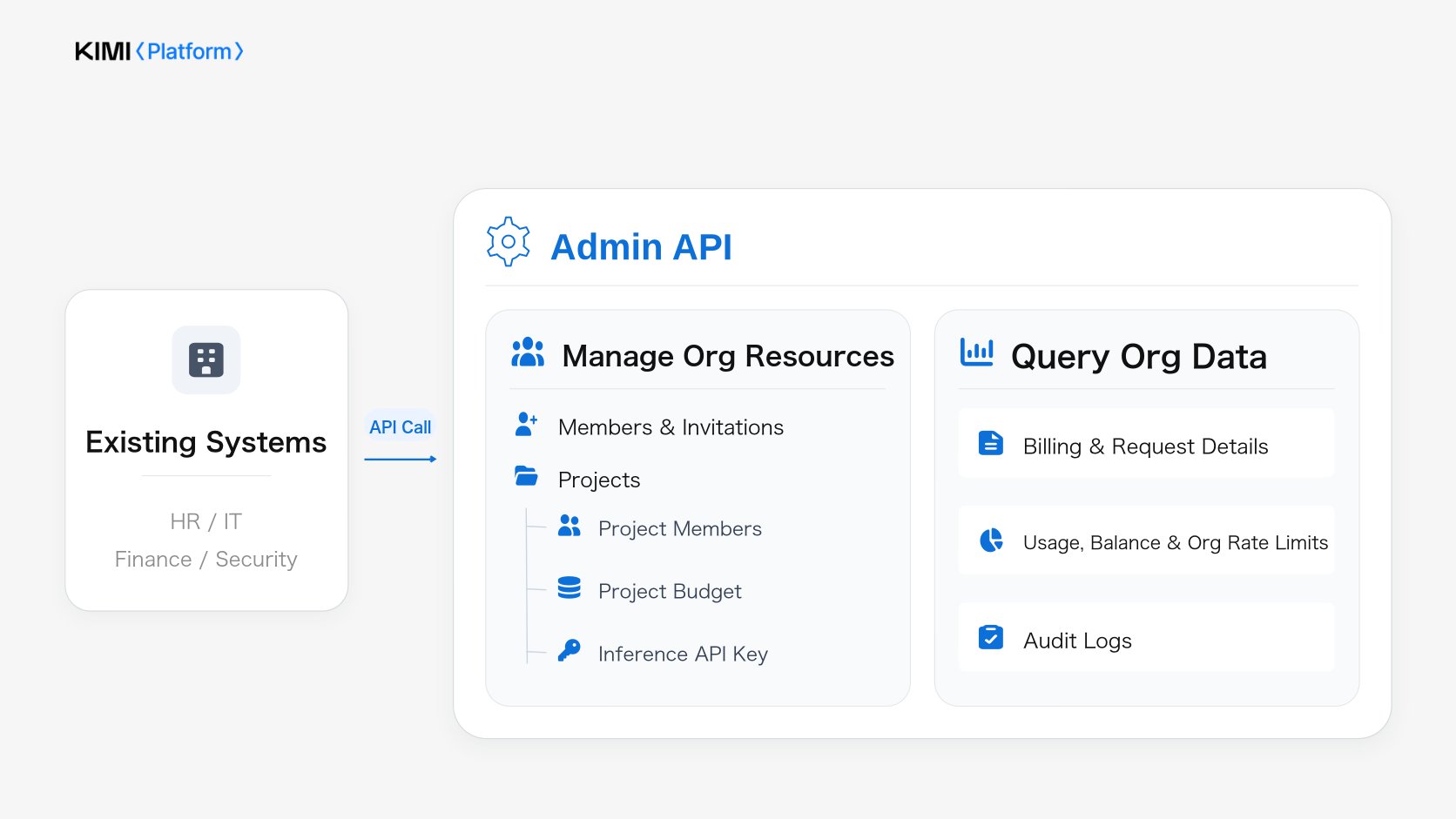
Manage organization resources
The write operations below requireorg:write, and the key owner must still be an organization admin when the request is made.
Manage organization members
You can use the API to create invitations, check invitation status, list organization members, update member roles, and remove members. After an invitation is accepted, assign project access to the new member. Before removing a member, revoke their inference API keys first. After a member is removed from the organization, their Admin API keys stop working, but their project inference API keys are not revoked automatically.Manage projects and budgets
You can use the API to create, update, and archive projects, and to set daily and monthly project spending budgets. Project spending accumulates over the Asia/Shanghai calendar day and month for the daily and monthly budgets, respectively. When spending reaches a configured budget greater than 0, subsequent API requests for that project are rejected. Consumption statistics and limit enforcement may be delayed, and charges incurred during the delay must still be paid. Before archiving a project, confirm that no active workloads depend on it.Manage project members
You can use the API to add project members, update their project roles, and remove them from projects. Only existing organization members can be added.Manage inference API keys
You can use the API to query, rename, and revoke existing inference API keys, but not to create them. Before revoking a key, confirm its project and owner to avoid disrupting active workloads.Query organization data
Query bills and request details
Use daily bills and product bills as the source of truth for billing amounts. They support financial reconciliation and cost allocation by project. Request details provide per-request token usage. Daily bills, product bills, and request details for a given day become available at 07:00 (UTC+8) the next day. Interrupted request details are not subject to this delay; same-day records are available as they are written.Query usage, balance, and organization rate limits
- Usage aggregation: Query token usage and request counts by minute, hour, or day to analyze usage trends and project usage.
- Account balance: Check the balance periodically and send an alert or initiate a top-up approval workflow when it falls below your internal threshold.
- Organization rate limits: When inference requests return 429, first check the organization rate limits, then use usage data and request logs to help determine whether the errors were caused by rate limiting.
Query audit logs
Audit logs cover console admin actions, sign-in events, and Admin API operations. Use them to investigate suspicious sign-ins, permission changes, and key management operations. An organization admin must enable audit logging in the console first. Only events generated after it is enabled are available. Earlier events are not backfilled, and no events are recorded while it is disabled.Usage notes
- Review Admin API key ownership: If a key owner leaves the organization or their account is deactivated, their Admin API keys stop working. Review key owners and scopes regularly, and reassign related automation tasks promptly.
- Handle Admin API rate limiting: All Admin API keys in the same organization share the rate limit for each endpoint. When an Admin API request returns 429, increase the wait time between retries. Adding more Admin API keys does not increase the limit.
Related documentation
FAQ
Where are Admin API keys and inference API keys created?
Where are Admin API keys and inference API keys created?
Both are created in the console. Organization admins create Admin API keys under Organization → Admin API Keys. Inference API keys are created under Organization → API Keys. The Admin API can query, rename, and revoke existing inference API keys, but cannot create them.
What happens when I revoke an inference API key or archive a project?
What happens when I revoke an inference API key or archive a project?
Revoking an inference API key takes effect immediately, and subsequent model calls with that key are rejected. After a project is archived, model calls made with its inference API keys are also rejected. Before automating either action, confirm which keys, projects, and workloads will be affected.
When are bills and request details available?
When are bills and request details available?
Daily bills, product bills, and request details for a given day become available at 07:00 (UTC+8) the next day. Interrupted request details are not subject to this delay; same-day records are available as they are written.
How do I check token usage for a single request using a request ID?
How do I check token usage for a single request using a request ID?
When calling an inference API, pass your own request ID in the
X-Msh-Client-Request-Id header. Retrieve request details for the relevant time range, then match each client_request_id value to the corresponding request ID in your internal logs to find the request’s token usage.Request details provide usage data, such as token counts, but not monetary amounts. For billing amounts, refer to daily bills and product bills. Request details and interrupted request details are retained for 90 days, and each query can cover at most 31 days.Do I need to enable audit logs in advance?
Do I need to enable audit logs in advance?
Yes. Your organization must enable audit logging in the console before events become available. Only events generated after it is enabled are recorded; earlier events are not backfilled, and no events are recorded while it is disabled. If you need audit logs, enable them when you start using the Admin API.